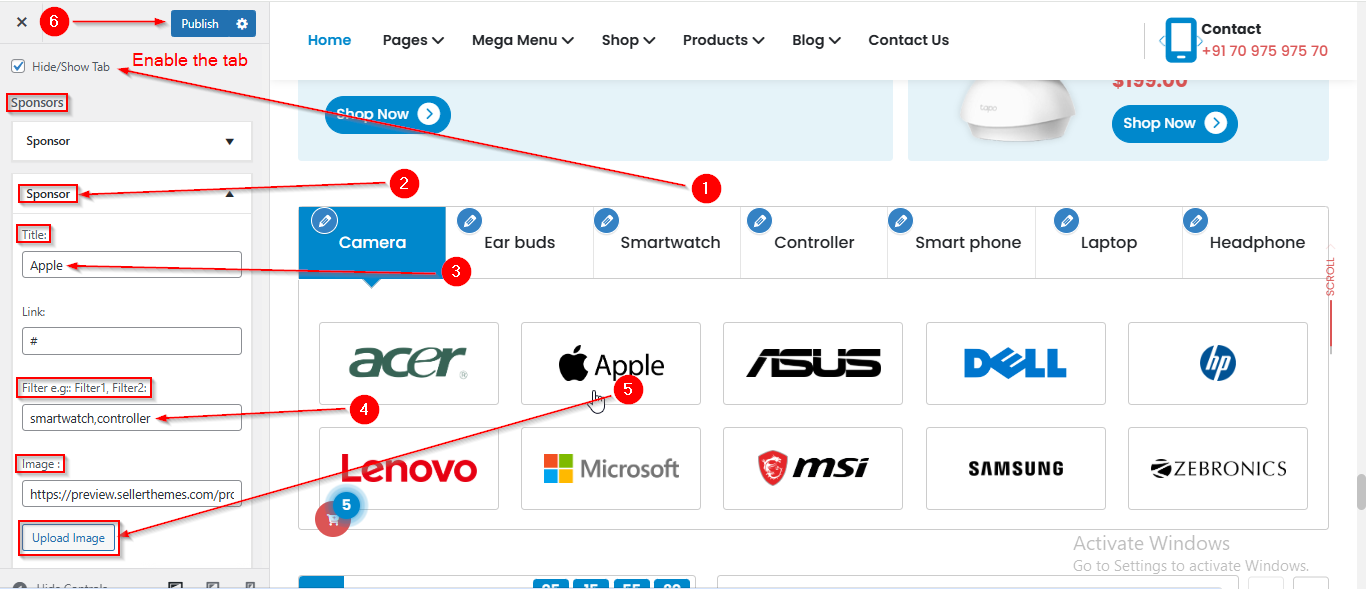
Electromix Free Sponsor Setup
In this article, you’ll learn how to set up and customize the Sponsor Section of the Electromix Free theme , This guide will help you configure these settings to align with your site’s branding and functionality needs.
(1) How to manage the Sponsor title , filter and image in Sponsor Section ?
Before proceeding, ensure you're logged into your WordPress Dashboard.
To manage the Sponsor title , filter and image in Sponsor Section, follow these steps:
- From the WordPress Dashboard, navigate to Appearance > Customize.
- On the Customizer page, go to Frontpage Sections > Sponsor Section.
- From Hide/Show Tab , you can manage the Tab.
- Here, you can manage the Section Title , Filter & Image.
- Click Publish when you're done.