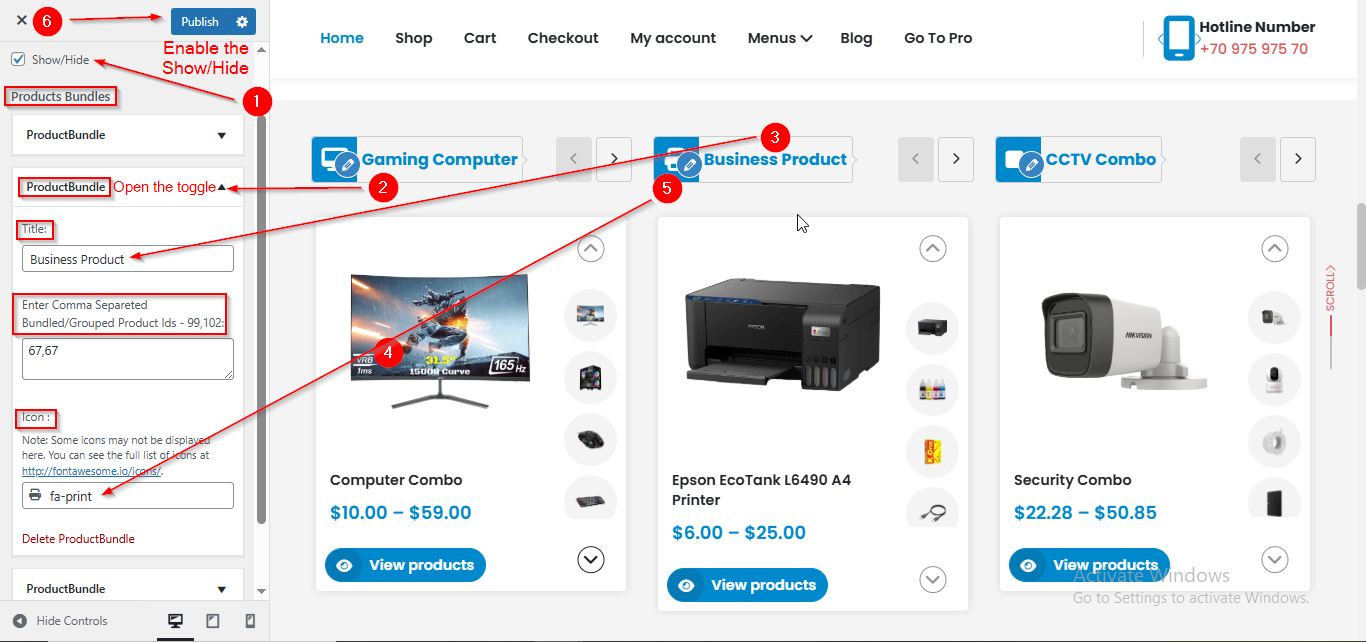
Electromix Free Bundled Slider Setup
In this article, you’ll learn how to set up and customize the Bundled Slider Section of the Electromix Free theme, . This guide will help you configure these settings to align with your site’s branding and functionality needs.
(1) How to manage the Bundled Slider Product content ?
Before proceeding, ensure you're logged into your WordPress Dashboard.
To manage the Bundled Slider Content in Slider Section, follow these steps:
From the WordPress Dashboard, navigate to Appearance > Customize.
- From the WordPress Dashboard, navigate to Appearance > Customize.
- On the Customizer page, go to Frontpage Sections > Bundled Products Slider.
- Here, open the ProductBundle toggle.
- Once the toggle is opened, you can manage the Bundled Slider Product content such as Title and Icon.
- Click Publish when you're done.