Mega Mart Lite Info Setup
In this article, you’ll learn how to set up and customize the Info Section of the Mega Mart Lite theme, This guide will help you configure these settings to align with your site’s branding and functionality needs.
(1) How to manage the Info content in Info Section ?
Before proceeding, ensure you're logged into your WordPress Dashboard.
To manage the Info content in Info Section, follow these steps:
- From the WordPress Dashboard, navigate to Appearance > Customize.
- On the Customizer page, go to Frontpage > Info Section.
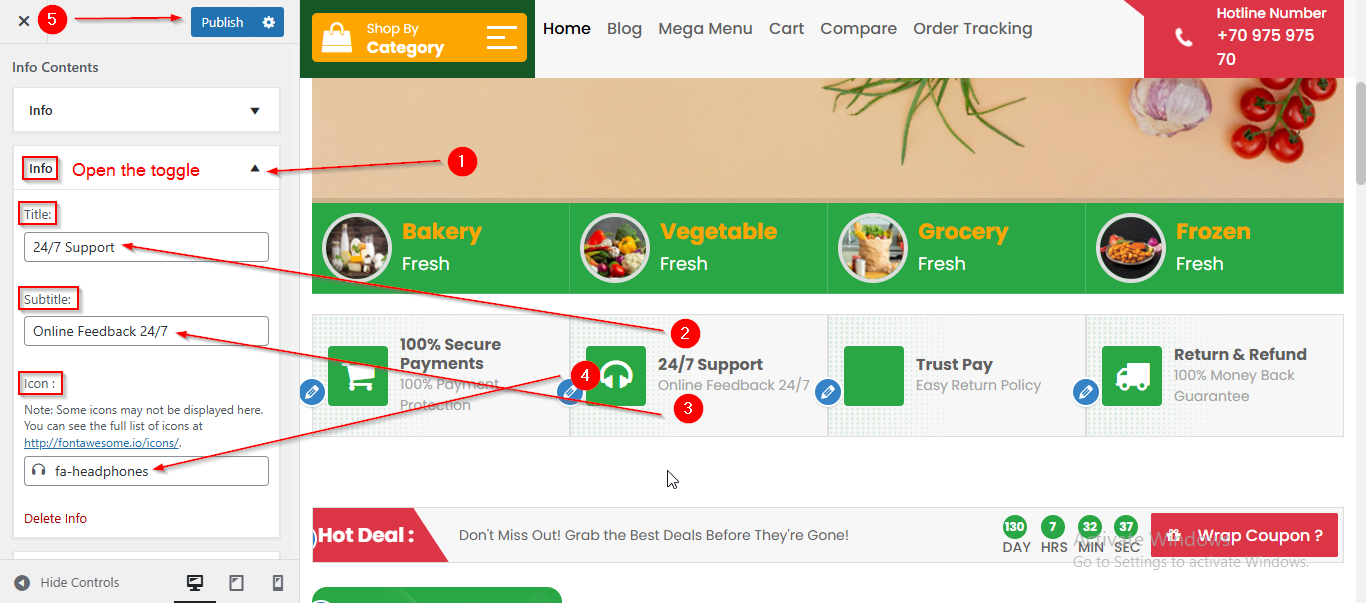
- Open the Info toggle to manage the content such as Title , Subtitle and Icon.
- Click Publish when you're done.